
Business
How to Add an Additional Place of Business in GST: A Complete 2025 Guide


Scaling your business is an exciting milestone. Whether you are opening a new branch, renting a warehouse for inventory, or setting up a virtual office for e-commerce sales, growth means progress. However, with expansion comes the responsibility of compliance. If you start operations from a new location without updating your GST registration, you risk significant penalties and operational bottlenecks.
The process to add an additional place of business in GST might seem technical, but it is a fundamental requirement for claiming Input Tax Credit (ITC) and generating valid e-way bills. This guide cuts through the jargon to provide you with a clear, step-by-step roadmap for 2025. We will cover the documents you need, the portal process, and how to avoid common rejection triggers.
What Is an Additional Place of Business (APOB) Under GST?
In GST terminology, your “Principal Place of Business” is the main address where your business books are kept and where the company’s head functions are performed.
An Additional Place of Business (APOB) refers to any other location within the same state where you:
- Conduct business (sales or services).
- Store goods (warehouses or godowns).
- Maintain books of accounts.
- Process orders (like Amazon FBA centers or Flipkart fulfillment hubs).
Essentially, if you are operating out of a location that isn’t your primary registered address, it falls under the umbrella of an additional place of business under GST.
Common Examples of APOB
- Warehouses/Godowns: Used strictly for storage.
- Branch Offices: Administrative or sales offices separate from the HQ.
- Virtual Offices: Used by e-commerce sellers to meet state-specific GST requirements without renting physical space.
- Factory Units: Secondary manufacturing plants within the same state.
Important Note: If your new place of business is in a different state, you cannot simply add it as an APOB to your current registration. You must obtain a fresh GST registration for that specific state.
Why You Must Declare Additional Places of Business
Skipping this step isn’t just a minor administrative oversight; it has real financial implications. Here is why the GST amendment for additional place of business is critical:
- Input Tax Credit (ITC): If you receive goods or services at a new location that isn’t registered, the ITC related to those purchases may be denied during an audit.
- E-Way Bills: You cannot generate an e-way bill for moving goods to or from a location that isn’t registered on the GST portal.
- Legitimacy: Operating from an undeclared location can lead to the confiscation of goods and imposition of penalties under Section 122 of the CGST Act.
- E-Commerce Compliance: Platforms like Amazon and Flipkart require you to register their fulfillment centers as your APOB to allow them to store and ship your inventory.
Documents Required for Additional Place of Business in GST
Before logging into the portal, ensure you have the correct digital paperwork. The documents required for additional place of business in GST depend on the nature of possession of the premises.
1. For Owned Premises
- Latest Property Tax Receipt.
- Municipal Khata copy.
- Copy of Electricity Bill.
- Ownership Deed/Legal ownership document.
2. For Rented or Leased Premises
- Valid Rent or Lease Agreement.
- Proof of ownership from the Landlord: A copy of the latest Property Tax Receipt or Electricity Bill in the landlord’s name.
3. For Shared Spaces or Consent-Based Premises (e.g., Family Owned)
- Consent Letter: A “No Objection Certificate” (NOC) from the owner stating they allow you to run the business from there.
- Proof of Address: Municipal Khata copy or Electricity Bill of the owner.
4. For Virtual Offices/Co-working Spaces
- Service Agreement with the Virtual Office provider.
- Utility bill (Electricity/Water) in the name of the provider.
- NOC from the owner: Explicitly mentioning the permission to use the address for GST registration.
Pro Tip: All files must be in PDF or JPEG format and under 1 MB in size.
Core vs. Non-Core Amendment: Which One Is It?
When you modify your GST registration, changes fall into two buckets: Core and Non-Core fields.
- GST Core Field Amendment: Includes changes to the legal name of the business, principal place of business, and additional places of business. These amendments usually require approval from a tax officer.
- GST Non-Core Field Amendment: Includes changes to email, phone numbers, or bank accounts. These are auto-approved.
Adding a new location is technically a Core Field Amendment. Once you submit the application, it goes to a tax official for verification. However, in many jurisdictions, if the documents are pristine, the approval can happen quite fast.
Step-by-Step Process to Add Another Business Location in GST
Follow this process to add another business location in GST to ensure your application is processed without queries.
Step 1: Login to the GST Portal
Visit www.gst.gov.in and enter your credentials. Complete the CAPTCHA to access your dashboard.
Step 2: Navigate to Amendment of Registration
Go to Services > Registration.
You will see two options for amendment. Select “Amendment of Registration Core Fields”.
Step 3: Select the Additional Places of Business Tab
The form will display several tabs (Business Details, Principal Place of Business, etc.). Click on the tab labeled “Additional Places of Business”.
Step 4: Add the New Location
- Look for the “Add New” button.
- Enter Details: Fill in the number of additional places you want to add.
- Address Fields: Enter the address details accurately.
-
- Pro Tip: Use the “Locate on Map” feature to pin the exact latitude and longitude, as this is increasingly mandatory for verification.
- Nature of Possession: Select whether the property is Owned, Rented, Leased, Consent, or Shared.
- Proof of Address: Upload the relevant documents (Rent agreement, Electricity bill, NOC, etc.) as discussed in the documents section.
- Nature of Business Activity: Check the boxes that apply (e.g., “Factory,” “Warehouse/Depot,” “Office/Sale Office”).
Step 5: Verification
Once the details are saved, navigate to the Verification tab.
- Select the verification checkbox.
- Choose the name of the Authorized Signatory from the dropdown.
- Enter the place (City).
- Digitally sign the application using DSC (Digital Signature Certificate) or EVC (Electronic Verification Code sent to mobile/email).
Step 6: Track ARN Status
Upon successful submission, a “Success” message will appear, and an Application Reference Number (ARN) will be sent to your registered email and mobile number. You can use this ARN to track the status of your application under Services > Registration > Track Application Status.
Timeline and Approval Process
After submitting form GST REG-14 (which is the backend form for amendments), the tax officer has roughly 15 working days to approve the application or raise a query.
- If Approved: You will receive a notification, and your GST Registration Certificate (REG-06) will be updated. You can download the fresh certificate from the portal.
- If Queries Raised: You will receive a notice in Form GST REG-03. You must reply within 7 working days with the necessary clarifications or documents.
Common Challenges and Solutions
Even experienced accountants face hurdles when trying to add an additional place of business on the GST portal. Here is how to troubleshoot them:
1. “Add New” Button Is Disabled
If you cannot click “Add New,” it means your original registration data declared “Zero” additional places.
Solution: Go back to the Principal Place of Business tab. Scroll to the bottom and find the toggle asking “Have Additional Place of Business?”. Switch it to YES. Save, and then proceed to the Additional Places tab.
2. Address Mismatch in Documents
The address on the rent agreement must match the address entered in the portal exactly.
Solution: Ensure spelling, pin codes, and door numbers are identical. If using a shared space, ensure the NOC explicitly states the full address including the specific office/desk number.
3. Verification Fails (DSC/EVC)
Sometimes the EVC DSC verification GST process times out.
Solution: Ensure your browser pop-up blocker is disabled and that your DSC software (EMSigner) is running with administrator privileges.
Consequences of Not Adding APOB
Ignoring the additional place of business GST rules can be costly.
- Penalty: Under Section 122 of the CGST Act, the penalty for not registering a place of business can be up to ₹25,000 or 100% of the tax evaded, whichever is higher.
- Seizure: Goods stored in an undeclared warehouse can be seized by tax authorities during inspection.
- ITC Loss: You cannot claim Input Tax Credit on the rent, utilities, or assets purchased for an unregistered branch.
Frequently Asked Questions (FAQs)
What is the time limit to add an additional place of business?
While the GST Act says amendments should be filed within 15 days of the event (e.g., signing a new lease), the portal allows you to file it anytime. However, it is best practice to do it before you start moving goods to the new location.
How do I delete an additional place of business in GST?
To delete an additional place of business in GST, follow the same steps: Login > Amendment of Core Fields > Additional Places of Business. Instead of “Add New,” locate the existing address you want to remove, click the “Delete” or “Edit” icon, provide a reason for deletion, and submit for verification.
Can I have multiple APOBs in the same state?
Yes, there is no strict limit on the number of APOBs you can add within a state under a single GSTIN.
Is physical verification mandatory for APOB?
It is not mandatory for every case, but tax officers have the discretion to conduct physical verification if they suspect the location is non-existent or “fake,” especially for virtual offices.
Conclusion
Updating your GST registration to include a new branch or warehouse is more than just a compliance tick-box; it protects your inventory and your right to tax credits. By following this guide on how to add an additional place of business in GST, you can ensure a smooth expansion in 2025.
Remember, the key lies in the documents. Ensure your proof of address for GST is valid, clear, and recent. Once you have the paperwork ready, the portal process is straightforward. Don’t wait for a notice from the tax department—update your registration as soon as you expand.
Ready to add your new office? Login to the GST portal now and get compliant!

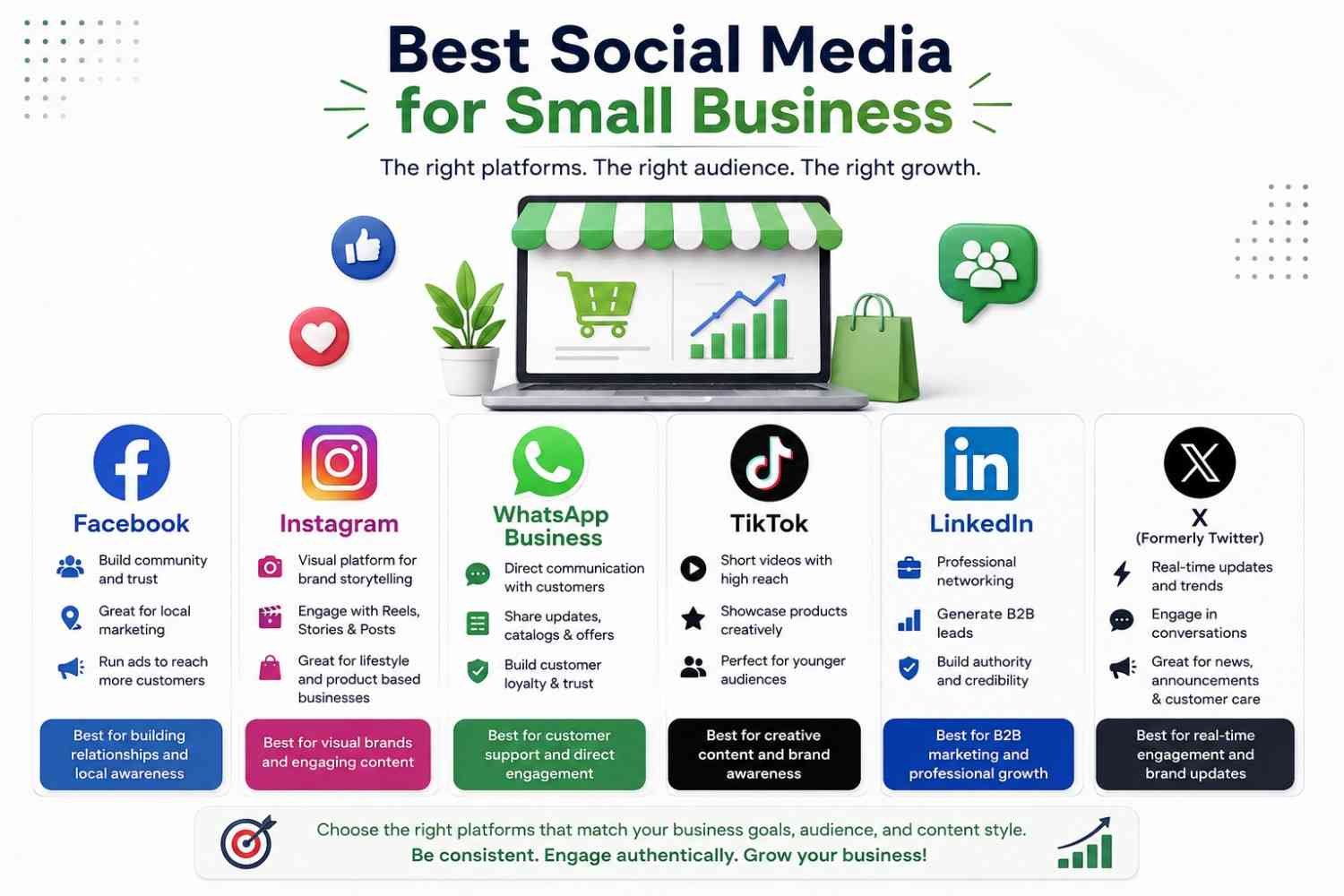
Find out which are the best social media networks for small businesses in 2026. Compare the top platforms, advantages, and tips from experts on how to increase brand awareness, generate leads, and sales.
Social media is one of the best means of marketing your products online as a small business. No matter what your small business is – whether you operate a local store, an online business, a service-based firm, or a startup – the right social media platform could be the answer to your success.
Why Social Media Matters for Small Businesses
There are billions of people who use social media networks regularly. Today, customers are finding out about new products, comparing various brands, reviewing, and even buying from social media websites.
Advantages are:
- Increasing brand awareness
- Reaching local as well as international customers
- Generating qualified leads
- Improving customer engagement
- Creating credibility
- Driving traffic on the website
- Increasing online sales
- Establishing customer relationships
- Customer feedback
- Promotion of products at a low cost
Unlike traditional marketing methods, social media helps you engage your customers directly without having to spend as much.
What Is the Best Social Media for Small Business?
Choosing the right social media network depends on many factors, such as target audience, goals of the business, and nature of products or services. Instead of being active on all social media networks, focus on those that your target audience uses most frequently. This is a list of the top five social media platforms that suit small businesses in 2026.
1. Facebook
Facebook is an ideal social media site for small businesses due to its provision of business pages, community groups, reviews, Messenger, and paid advertising options. Facebook may assist in creating brand awareness, generating leads, customer connections, and making sales in both online and offline settings.
2. Instagram
The Instagram application is most appropriate for a business that markets itself and gains more customers with the help of visual content. Features like Reels, Stories, product tagging, and Instagram Shopping allow the business to promote its product and increase awareness of itself.
3. WhatsApp Business
The WhatsApp Business application allows the business to communicate with its customers through instant messaging, automated responses, a product catalog, and order updates. It helps improve the customer service quality, building trust, developing relationships, and maybe get more purchases through personal services, kind of like that.
4. TikTok
TikTok helps small businesses reach a large number of customers by using creative videos and what you could call trend-driven content. The advanced algorithm lets the business gain advantages from organic reach, brand awareness, getting in front of young customers, and driving traffic without having to invest too much in advertising or in marketing skills, you know.
5. LinkedIn
LinkedIn is honestly the most successful place for B2B marketing and networking. Small businesses can tap into decision-makers, catch up on industry trends, and generate real, high-intent leads. It also helps to build a sense of credibility, and even recruit strong talent, not to mention create links with potential customers, plus partners.
6. X (Formerly Twitter)
It is perfect for business organizations to provide instant notifications and customer support. It is suited for technology organizations and media organizations as well as personal branding, but demands regular posts due to the short-lived nature of content.
Which Social Media Platform Should You Choose?
| Platform | Best For | Main Benefit |
| Local businesses | Brand awareness, advertising, and community engagement | |
| Visual brands | Product promotion and customer engagement | |
| WhatsApp Business | Customer communication | Instant support and direct sales |
| TikTok | Younger audiences | Viral reach and brand awareness |
| B2B businesses | Professional networking and lead generation |
Best Social Media by Business Type
Local Business
Facebook, Instagram, and Google My Business will help the local business gain more visibility in local search, boost enquiries, drive foot traffic, post updates, and get reviews.
Online Store
Instagram, Facebook, Pinterest, and TikTok are ideal for online stores because they will support their products with visuals, they will attract web traffic, they will improve interaction with their customers, and they will sell through social commerce.
B2B Company
B2B companies sort of have these social media sites for finding reliable leads, posting industry news, networking, posting educational content, and just general brand awareness and reputation building with decision makers.
Restaurant
Instagram, Facebook, and TikTok allow restaurants to share their amazing food, publish their specials, post reviews from their customers, attract local visitors, and ultimately secure more and more reservations with attention-grabbing and entertaining visuals.
Healthcare
Facebook, LinkedIn, and YouTube are all media that can be used to educate patients, share health information, establish trust, market healthcare services, and make someone an expert on providing informational content.
Fitness Business
Instagram, YouTube, and TikTok are great platforms for the fitness industry to post workout videos, pictures of progress, healthy tips, workout routines, and motivating posts to attract and hang on to customers.
Real Estate
Other social media platforms like Facebook, Instagram, LinkedIn, and YouTube allow real estate agents to post property listings, facilitate virtual tours, provide market updates and information, provide customer reviews and feedback, and foster trust with the next generation of clients.
How to Choose the Best Social Media Platform
Before setting up accounts on every platform, consider what you wish to achieve. Think about:
- Who am I targeting?
- Where are my customers based?
- What kind of content can I consistently create?
- Do I need sales, leads, traffic, or awareness?
- How much time can I commit?
Joining just one or two social media sites usually gives you better returns than trying to maintain all social networking sites.
Five Mistakes That Waste the Most Time
- Being active on five channels with 20% efforts. Consolidate.
- Posting promotions only. If every post is asking for money, reach will die.
- Organic reach on Facebook when you have no budget. When page reach is at 2–5% of followers, Facebook in 2026 is going to be a paid and community network, not an organic broadcast one.
- Producing too much. User-generated and authentic content outperforms branded and polished content by about 43%. The smartphone is enough.
- Failing to respond to messages. Check the 73% number switching. It’s marketing.
One strategic reminder: Social media should be used to feed into an owned channel. Email continues to yield about a $42 return on every dollar invested, the most effective retention channel there is. Use social to gain and use email and WhatsApp to retain.
Conclusion
The choice of the proper social media platform to use should be determined by various factors, among them being the target audience as well as what goals you would like to achieve. It is important to make sure that the platform selected has your customers, creates content, interacts with them, and performs their activities on the site. Social media marketing can be beneficial to your business in many ways.
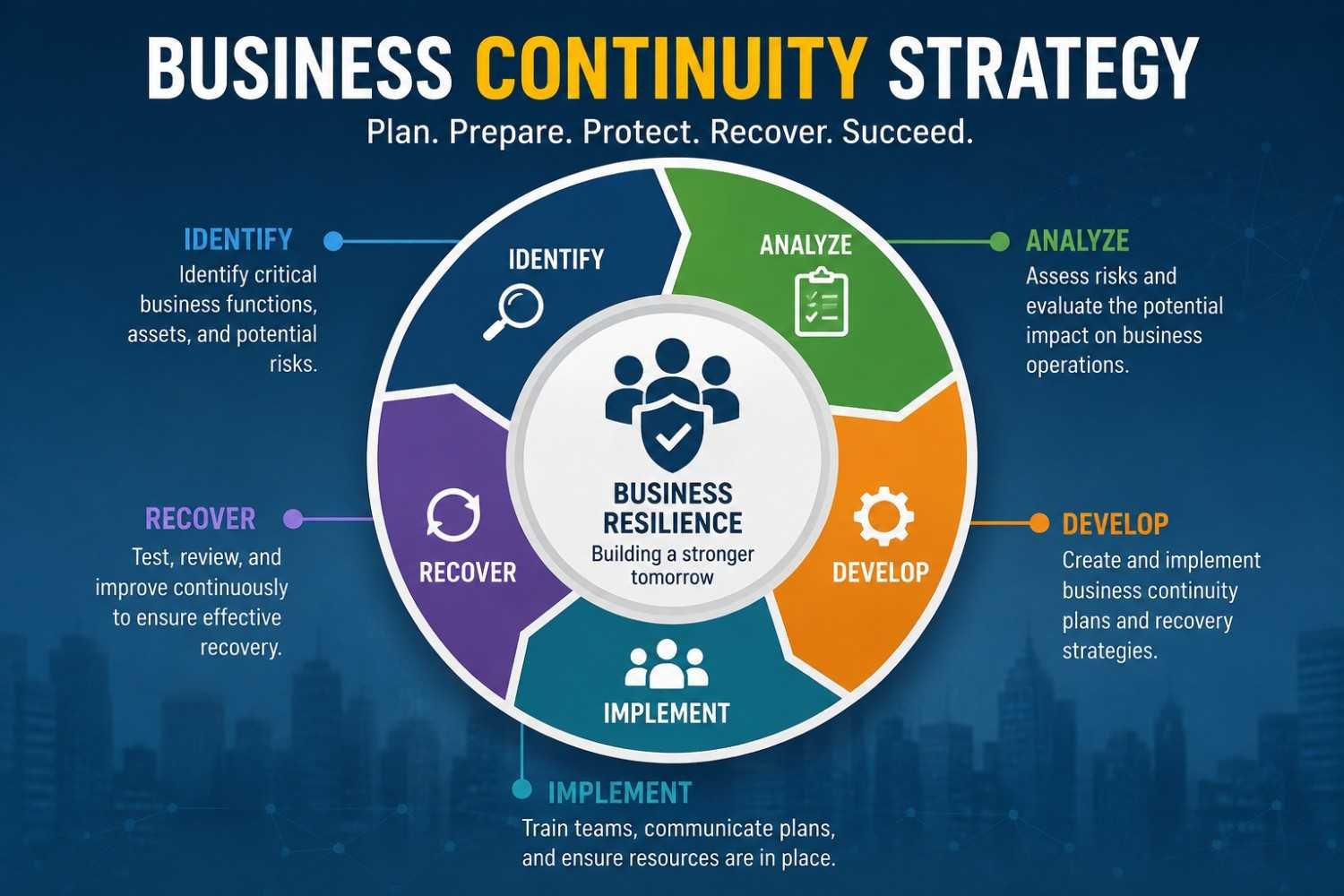
Learn what a business continuity strategy is, its key components, examples, benefits, and best practices to protect operations and recover faster.
Business continuity planning is the method that an organization uses to make sure that its essential activities run smoothly despite any unexpected occurrences. The unexpected occurrence might be anything ranging from cyber-attacks to natural disasters, electricity failures, equipment failures, epidemics, and interruptions in supply chains.
The ultimate aim of the business continuity plan is to reduce downtime, ensure the safety of employees, take care of the customers, and save money while doing so. A business continuity plan is a vital concept that ensures that organizations can prepare themselves in case of any emergency.
What Is a Business Continuity Strategy?
Business Continuity Planning is a document and process that assists in maintaining the basic functioning of the organization despite and after any disruption, as well as bringing back the normal business activity as soon as possible.
Business Continuity Strategy Examples
Alternate Work Sites (Hot, Warm, Cold)
Companies have backup sites of different preparedness levels in order to conduct operations if the main facility is not available.
Remote Workforce Activation
Employees can safely work from any other place, including their homes, with the help of cloud computing, virtual private networks, and collaboration tools due to disruptions.
Mutual Aid Agreements
Companies establish partnerships with other companies to use common resources, infrastructure, staff, or equipment during crises and afterward.
Cross Training and Succession Planning
Employees train for various responsibilities to ensure that any crucial activities proceed smoothly even when some personnel are absent due to a disruption.
Manual Workarounds
Companies adopt temporary work methods through the use of paper/manual processes where there is an unavailability of computer systems during an emergency.
Crisis Communication
Organizations provide quick and correct information to staff members, customers, suppliers, or other interested parties.
Core Components of a Business Continuity Strategy
1. Business Impact Analysis (BIA)
This is the bedrock on which all continuity planning is based. The BIA determines which processes of a business organization are essential, how disruption impacts these processes, and what the allowable amount of downtime would be for each (known as the Recovery Time Objective or RTO). This also helps in determining the Recovery Point Objectives or RPO.
2. Risk Assessment
The identification process will be aimed at identifying the threats that an organization faces, which may include natural hazards, cyber attacks, disruptions in the supply chain, epidemics, technical malfunctions, or even human error.
3. Strategy Development
Using the BIA and risk analysis, organizations devise strategies tailored to each critical activity. This can entail:
- Redundant backup systems, alternate suppliers, or redundant sites
- Telecommuting ability to work from any location
- Data backup and restoration solutions, such as cloud backup or off-site storage
- Staff cross-training to ensure that more than one person is capable of doing critical jobs
4. Plan Development and Documentation
This converts the strategy into an action plan by specifying:
- Job descriptions and duties (who is responsible for what during a crisis)
- Response procedure (step-by-step procedure)
- Communication process (internal/external)
- Contact list and escalation procedure
5. Testing and Training
The effectiveness of a plan can be measured by how well it is implemented. It is essential to conduct tabletop exercises, simulations, and drills to check the plan and ensure that all employees know what to do.
6. Maintenance and Continuous Improvement
Business continuity planning is an ongoing process. The plans need to be updated regularly to factor in changes in personnel, technology, and vendors.
Common Business Continuity Strategies
| Strategy | Description |
| Data backup and cloud recovery | Storing critical data offsite or in the cloud to prevent total loss |
| Alternate work locations | Identifying backup offices or enabling remote work |
| Supplier diversification | Avoiding reliance on a single vendor or supply route |
| Redundant IT infrastructure | Backup servers, failover systems, and network redundancy |
| Crisis communication plans | Predefined messaging for employees, customers, and media |
| Succession planning | Ensuring leadership continuity if key personnel are unavailable |
| Insurance coverage | Financial protection against losses from major disruptions |
The 5 Foundations of a Solid Business Continuity Strategy
1. Business Impact Analysis (BIA)
A Business Impact Analysis determines vital business functions, assesses disruption impact on business operations, calculates monetary losses, and prioritizes business continuity plans to ensure that vital functions start running again.
2. Risk Assessment
Risk assessment points out the potential risks, which can be cyber attacks, natural disasters, system failures, human errors, and so forth. Risk assessment assesses the probability and impact, and helps organizations to come up with preventive and recovery strategies.
3. Critical Function Identification
Critical functions identification helps establish what business functions need to continue even amid the disruption. Ensuring the priority of these critical functions ensures the focus on keeping operational activities that provide services to customers and hence revenue.
4. Recovery Time Objectives (RTO) and Recovery Point Objectives (RPO)
Time Objectives for Recovery (RTO) state the time required to recover the services, while Point Objectives for Recovery (RPO) determine the degree of loss that can be tolerated. Both of these determine the process of recovery and technology selection.
5. Communication Plan
The communication process refers to how people, such as employees, clients, suppliers, and other stakeholders,s are notified about the emergency. Good communication eliminates confusion and boosts confidence.
Business Continuity vs. Disaster Recovery
The two concepts are commonly misunderstood to be similar, but actually meandifferent thingsy:
- Business Continuity is a broadterm thath covers the entire business process (People & Operations).
- On the other hand, Disaster recovery is more specific and pertains to restoring the IT systems after an event or situation.
Disaster recovery is usually a part of the broader business continuity plan.
Common Mistakes Businesses Should Avoid
Avoid these common errors:
- Failure to document processes
- Overlooking cybersecurity threats
- Failure to test the plan
- Outdated contact details
- Lack of employee training
- Dependence on one supplier
- Lack of data backup
- Poor communication planning
Best Practices for Business Continuity Strategies
Use the following proven techniques:
- Perform yearly risk assessments.
- Maintain multiple copies of data.
- Backup data at distant places or utilize cloud storage.
- Test your data recovery process regularly.
- Update emergency contact lists.
- Frequently train employees.
- Assess your plans after each occurrence.
- Collaborate with trusted technology companies.
- Develop a relationship with backup providers.
- Constantly monitor new business risks.
Conclusion
A business continuity plan allows companies to be prepared for any possible disruptions while taking care of their employees, customers, and operations. The process involves risk assessment, recovery planning, testing, and updating the plan. The implementation of the business continuity plan is important for companies as it ensures the future success of their businesses.

Learn what Amazon Business is, how it works, its features, benefits, pricing, Business Prime, and why organizations use it to simplify procurement.
Amazon Business is a procurement service for businesses that is developed by Amazon and assists companies in buying products and services in an efficient way. Amazon Business provides business-oriented products, business discounts, tax exemptions, purchasing process workflow approvals, multi-user accounts, and expenditure reports to organizations.
While a normal Amazon account is created for individual use, Amazon Business is a dedicated account that is customized for small businesses, startups, enterprises, schools, nonprofit organizations, and governmental organizations.
No matter whether you have a small office or handle procurement in a large corporate entity, Amazon Business makes purchasing easier while saving on costs and increasing efficiency.
How Does Amazon Business Work?
Amazon Business is a website that functions like any other Amazon portal but comes equipped with some special functions designed for businesses.
To become an Amazon Business customer, a company needs to register at Amazon Business, which is completely free. Once registered, the business can:
- Purchase products from business suppliers
- Add multiple employees to one account
- Set purchasing permissions
- Approve employee purchases
- Receive business-only discounts
- Track company spending
- Download invoices
- Manage tax exemptions
- Buy in bulk
The platform is compatible with numerous procurement systems that facilitate efficient procurement processes within bigger companies.
Why Did Amazon Create Amazon Business?
Amazon introduced Amazon Business in order to tackle the issues related to procurement faced by organizations. Traditional purchasing typically includes:
- Manual purchase orders
- Multiple vendors
- Lengthy approval processes
- Limited spending visibility
- Complex invoice management
Amazon Business consolidates all of these purchasing tasks into one single platform for efficient purchasing and saving time for organizations.
Amazon Business Key Features, Benefits, and Costs
1. Greater Access and Business-Only Offers
Amazon Business provides companies with access to a multitude of products in different categories, such as office products, industrial products, healthcare products, and technological products. Businesses are offered exclusive discounts and deals that are not available to ordinary customers.
2. Business Pricing
Amazon Business provides special business rates for certain products, enabling businesses to benefit from cost reductions through low rates and discounts. Cost reduction is important for businesses as it enables them to make efficient procurement budgeting for quality products from different sellers.
3. Business Prime Benefits and Signing Up
Business Prime adds to the existing Amazon Business experience through quicker delivery, more analytics, buying guidance, and expense tracking. Businesses may join through subscription for a particular Business Prime package after signing up for an Amazon Business account.
4. Multi-User Access with Business Prime Comes with a Cost
Multi-users can be supported in Business Prime under one account for efficient purchasing of items while maintaining management abilities. Advanced business prime plans will support more users and management tools, with pricing depending on the size of the business.
5. Approval Workflow Helps Foster Responsible Spending
The approval process involves assigning managers who will scrutinize the requests from employees before placing the order. The use of the approval workflow minimizes any unnecessary spending, enhances budget adherence, and helps the purchasing decisions conform to the financial goals of the company.
6. Insight from Analytics
Amazon Business offers analytical and reporting capabilities that allow one to monitor purchase trends, expenditure within departments, ordering patterns, and performance of suppliers. This is beneficial for optimizing budgets and making informed procurement choices.
7. Various Payment Options
Amazon Business provides several ways to pay for your purchases, such as business credit cards, debit cards, corporate accounts, invoices, and purchase orders, among others. Various modes of payment make financial management easier while taking into consideration different procurement practices.
8. Tax Exemption
Tax-exempt purchases are available through Amazon Business to eligible organizations in order to lower procurement expenses for nonprofit organizations, educational institutions, and government entities. Tax exemptions are automatically provided on qualifying purchases when eligibility is established.
9. Consolidated Deliveries
This program consolidates deliveries because Amazon combines multiple deliveries to form fewer deliveries where possible. This helps in reducing packaging waste, reducing shipping expenses, reducing any delivery interruption, and also in helping organizations adopt more sustainable purchasing processes.
Who Uses Amazon Business?
Amazon Business is meant for all types of organizations, including:
- Startups and small businesses that wish to have an easy solution to procure office supplies, equipment, and inventory without confusing personal purchases with business purchases
- Mid-size organizations requiring several employees to make purchases using common budget plans and policies
- Enterprise-level organizations have elaborate procurement procedures, approval processes, and systems integrations
- Government, educational, health care, and non-profit institutions that can use tax-exempt purchasing programs
- Resellers and Industrial Buyers making purchases in bulk for their supplies and MRO (Maintenance, Repair, and Operations) products and inventory
How Amazon Business Differs From a Regular Amazon Account
| Feature | Amazon.com (Consumer) | Amazon Business |
| Pricing | Standard consumer pricing | Business-only pricing, quantity discounts |
| Accounts | Single user | Multiple users under one organization |
| Approvals | None | Configurable spending limits and approval workflows |
| Tax | Sales tax is applied at checkout | Tax exemption available for qualifying orgs |
| Payment | Personal cards, gift cards | Purchase orders, invoicing, centralized billing |
| Reporting | Basic order history | Detailed spend analytics and export tools |
| Supplier base | Amazon retail + 3P sellers | Expanded B2B-focused supplier network |
Is Amazon Business Free to Join?
Absolutely, having an Amazon Business account doesn’t cost anything. The costs are incurred when something is bought, and there is also the option of having an Amazon Business Prime subscription, which would incur more charges. The low-cost aspect has contributed greatly to the quick rise of the platform within small and medium-sized businesses.
Common Products Purchased Through Amazon Business
Organizations commonly purchase:
- Office supplies
- Computers
- Laptops
- Monitors
- Industrial equipment
- Cleaning supplies
- Safety equipment
- Medical supplies
- Restaurant supplies
- Furniture
- Packaging materials
- Electronics
- Networking equipment
- Maintenance products
- Warehouse supplies
Nearly every business category can source products through the platform.
Pros and Cons of Amazon Business
Advantages
- Free business account
- Business-exclusive pricing
- Easy account management
- Bulk purchasing
- Spending controls
- Purchase approvals
- Business analytics
- Invoice management
- Large product selection
- Supports organizations of all sizes
Limitations
- Not all products have business prices.
- Delivery time differs from one seller to another.
- Advanced features can be available only with a Business Prime subscription.
- Purchase restrictions are imposed on some products depending on your geographical location and the sellers.
Conclusion
Business users who want to improve their purchasing experience can benefit from Amazon Business because it offers them business-friendly pricing, approval flows, multi-user access, analytics, and tax-exempt purchasing for qualified customers. For any user who is managing either a small start-up or a big business, Amazon Business can offer a better procurement experience and reduce the administrative load.
-

 BLOG2 years ago
Unlocking Opportunities: Top Small Business Ideas in Hyderabad
-

 Business2 years ago
Hеartfеlt Bеst Wishеs for Nеw Businеssеs: Encouragеmеnt & Succеss Tips
-

 BLOG2 years ago
Top Automotivе Businеss Idеas: Explorin’ Profitablе Vеnturеs in thе Auto Industry
-

 BLOG2 years ago
Small Business Ideas from Home for Ladies: Empower Your Entrepreneurial Spirit
-

 BLOG1 year ago
What is Traceloans.com Student Loans?
-

 BLOG2 years ago
Medicine Wholesale Business: An In-Depth Overview
-
BLOG2 years ago
Business Ideas in Tamilnadu: Profitable Options for Entrepreneurs
-

 BLOG2 years ago
Part Time Business Ideas in Tamil You Can Start from Home