
Business
Business Continuity Strategy: Benefits, Plan & Examples

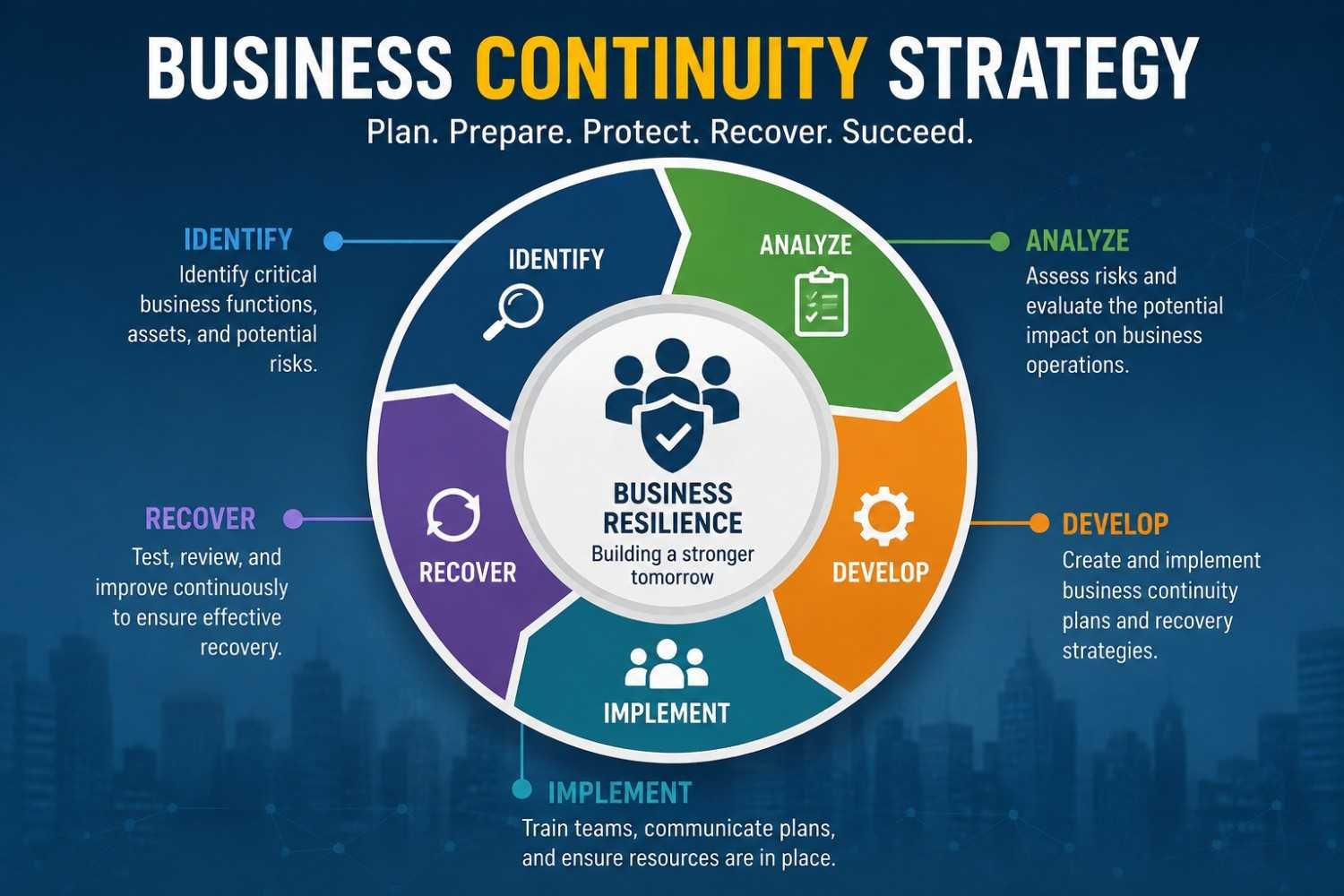
Learn what a business continuity strategy is, its key components, examples, benefits, and best practices to protect operations and recover faster.
Business continuity planning is the method that an organization uses to make sure that its essential activities run smoothly despite any unexpected occurrences. The unexpected occurrence might be anything ranging from cyber-attacks to natural disasters, electricity failures, equipment failures, epidemics, and interruptions in supply chains.
The ultimate aim of the business continuity plan is to reduce downtime, ensure the safety of employees, take care of the customers, and save money while doing so. A business continuity plan is a vital concept that ensures that organizations can prepare themselves in case of any emergency.
What Is a Business Continuity Strategy?
Business Continuity Planning is a document and process that assists in maintaining the basic functioning of the organization despite and after any disruption, as well as bringing back the normal business activity as soon as possible.
Business Continuity Strategy Examples
Alternate Work Sites (Hot, Warm, Cold)
Companies have backup sites of different preparedness levels in order to conduct operations if the main facility is not available.
Remote Workforce Activation
Employees can safely work from any other place, including their homes, with the help of cloud computing, virtual private networks, and collaboration tools due to disruptions.
Mutual Aid Agreements
Companies establish partnerships with other companies to use common resources, infrastructure, staff, or equipment during crises and afterward.
Cross Training and Succession Planning
Employees train for various responsibilities to ensure that any crucial activities proceed smoothly even when some personnel are absent due to a disruption.
Manual Workarounds
Companies adopt temporary work methods through the use of paper/manual processes where there is an unavailability of computer systems during an emergency.
Crisis Communication
Organizations provide quick and correct information to staff members, customers, suppliers, or other interested parties.
Core Components of a Business Continuity Strategy
1. Business Impact Analysis (BIA)
This is the bedrock on which all continuity planning is based. The BIA determines which processes of a business organization are essential, how disruption impacts these processes, and what the allowable amount of downtime would be for each (known as the Recovery Time Objective or RTO). This also helps in determining the Recovery Point Objectives or RPO.
2. Risk Assessment
The identification process will be aimed at identifying the threats that an organization faces, which may include natural hazards, cyber attacks, disruptions in the supply chain, epidemics, technical malfunctions, or even human error.
3. Strategy Development
Using the BIA and risk analysis, organizations devise strategies tailored to each critical activity. This can entail:
- Redundant backup systems, alternate suppliers, or redundant sites
- Telecommuting ability to work from any location
- Data backup and restoration solutions, such as cloud backup or off-site storage
- Staff cross-training to ensure that more than one person is capable of doing critical jobs
4. Plan Development and Documentation
This converts the strategy into an action plan by specifying:
- Job descriptions and duties (who is responsible for what during a crisis)
- Response procedure (step-by-step procedure)
- Communication process (internal/external)
- Contact list and escalation procedure
5. Testing and Training
The effectiveness of a plan can be measured by how well it is implemented. It is essential to conduct tabletop exercises, simulations, and drills to check the plan and ensure that all employees know what to do.
6. Maintenance and Continuous Improvement
Business continuity planning is an ongoing process. The plans need to be updated regularly to factor in changes in personnel, technology, and vendors.
Common Business Continuity Strategies
| Strategy | Description |
| Data backup and cloud recovery | Storing critical data offsite or in the cloud to prevent total loss |
| Alternate work locations | Identifying backup offices or enabling remote work |
| Supplier diversification | Avoiding reliance on a single vendor or supply route |
| Redundant IT infrastructure | Backup servers, failover systems, and network redundancy |
| Crisis communication plans | Predefined messaging for employees, customers, and media |
| Succession planning | Ensuring leadership continuity if key personnel are unavailable |
| Insurance coverage | Financial protection against losses from major disruptions |
The 5 Foundations of a Solid Business Continuity Strategy
1. Business Impact Analysis (BIA)
A Business Impact Analysis determines vital business functions, assesses disruption impact on business operations, calculates monetary losses, and prioritizes business continuity plans to ensure that vital functions start running again.
2. Risk Assessment
Risk assessment points out the potential risks, which can be cyber attacks, natural disasters, system failures, human errors, and so forth. Risk assessment assesses the probability and impact, and helps organizations to come up with preventive and recovery strategies.
3. Critical Function Identification
Critical functions identification helps establish what business functions need to continue even amid the disruption. Ensuring the priority of these critical functions ensures the focus on keeping operational activities that provide services to customers and hence revenue.
4. Recovery Time Objectives (RTO) and Recovery Point Objectives (RPO)
Time Objectives for Recovery (RTO) state the time required to recover the services, while Point Objectives for Recovery (RPO) determine the degree of loss that can be tolerated. Both of these determine the process of recovery and technology selection.
5. Communication Plan
The communication process refers to how people, such as employees, clients, suppliers, and other stakeholders,s are notified about the emergency. Good communication eliminates confusion and boosts confidence.
Business Continuity vs. Disaster Recovery
The two concepts are commonly misunderstood to be similar, but actually meandifferent thingsy:
- Business Continuity is a broadterm thath covers the entire business process (People & Operations).
- On the other hand, Disaster recovery is more specific and pertains to restoring the IT systems after an event or situation.
Disaster recovery is usually a part of the broader business continuity plan.
Common Mistakes Businesses Should Avoid
Avoid these common errors:
- Failure to document processes
- Overlooking cybersecurity threats
- Failure to test the plan
- Outdated contact details
- Lack of employee training
- Dependence on one supplier
- Lack of data backup
- Poor communication planning
Best Practices for Business Continuity Strategies
Use the following proven techniques:
- Perform yearly risk assessments.
- Maintain multiple copies of data.
- Backup data at distant places or utilize cloud storage.
- Test your data recovery process regularly.
- Update emergency contact lists.
- Frequently train employees.
- Assess your plans after each occurrence.
- Collaborate with trusted technology companies.
- Develop a relationship with backup providers.
- Constantly monitor new business risks.
Conclusion
A business continuity plan allows companies to be prepared for any possible disruptions while taking care of their employees, customers, and operations. The process involves risk assessment, recovery planning, testing, and updating the plan. The implementation of the business continuity plan is important for companies as it ensures the future success of their businesses.
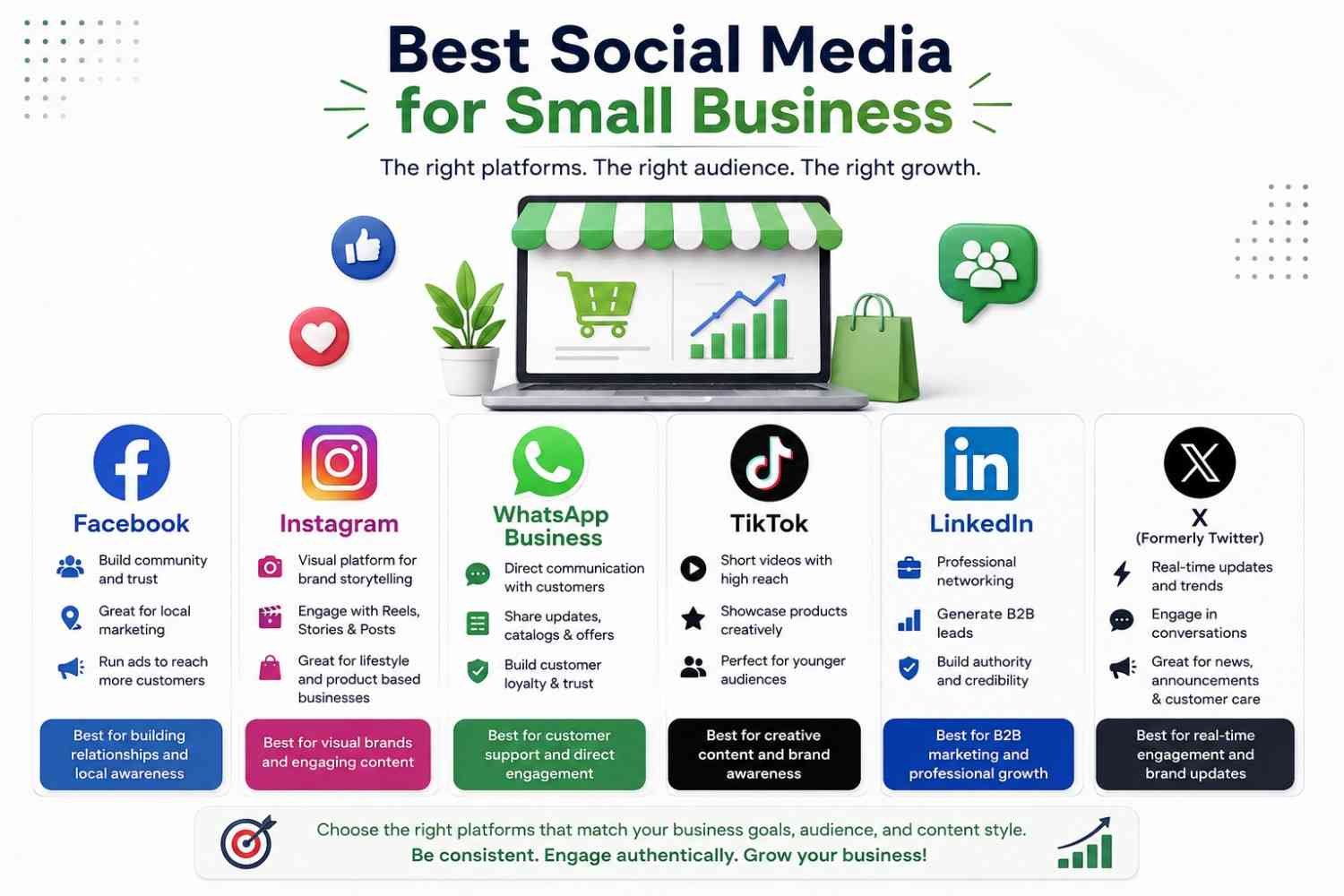
Find out which are the best social media networks for small businesses in 2026. Compare the top platforms, advantages, and tips from experts on how to increase brand awareness, generate leads, and sales.
Social media is one of the best means of marketing your products online as a small business. No matter what your small business is – whether you operate a local store, an online business, a service-based firm, or a startup – the right social media platform could be the answer to your success.
Why Social Media Matters for Small Businesses
There are billions of people who use social media networks regularly. Today, customers are finding out about new products, comparing various brands, reviewing, and even buying from social media websites.
Advantages are:
- Increasing brand awareness
- Reaching local as well as international customers
- Generating qualified leads
- Improving customer engagement
- Creating credibility
- Driving traffic on the website
- Increasing online sales
- Establishing customer relationships
- Customer feedback
- Promotion of products at a low cost
Unlike traditional marketing methods, social media helps you engage your customers directly without having to spend as much.
What Is the Best Social Media for Small Business?
Choosing the right social media network depends on many factors, such as target audience, goals of the business, and nature of products or services. Instead of being active on all social media networks, focus on those that your target audience uses most frequently. This is a list of the top five social media platforms that suit small businesses in 2026.
1. Facebook
Facebook is an ideal social media site for small businesses due to its provision of business pages, community groups, reviews, Messenger, and paid advertising options. Facebook may assist in creating brand awareness, generating leads, customer connections, and making sales in both online and offline settings.
2. Instagram
The Instagram application is most appropriate for a business that markets itself and gains more customers with the help of visual content. Features like Reels, Stories, product tagging, and Instagram Shopping allow the business to promote its product and increase awareness of itself.
3. WhatsApp Business
The WhatsApp Business application allows the business to communicate with its customers through instant messaging, automated responses, a product catalog, and order updates. It helps improve the customer service quality, building trust, developing relationships, and maybe get more purchases through personal services, kind of like that.
4. TikTok
TikTok helps small businesses reach a large number of customers by using creative videos and what you could call trend-driven content. The advanced algorithm lets the business gain advantages from organic reach, brand awareness, getting in front of young customers, and driving traffic without having to invest too much in advertising or in marketing skills, you know.
5. LinkedIn
LinkedIn is honestly the most successful place for B2B marketing and networking. Small businesses can tap into decision-makers, catch up on industry trends, and generate real, high-intent leads. It also helps to build a sense of credibility, and even recruit strong talent, not to mention create links with potential customers, plus partners.
6. X (Formerly Twitter)
It is perfect for business organizations to provide instant notifications and customer support. It is suited for technology organizations and media organizations as well as personal branding, but demands regular posts due to the short-lived nature of content.
Which Social Media Platform Should You Choose?
| Platform | Best For | Main Benefit |
| Local businesses | Brand awareness, advertising, and community engagement | |
| Visual brands | Product promotion and customer engagement | |
| WhatsApp Business | Customer communication | Instant support and direct sales |
| TikTok | Younger audiences | Viral reach and brand awareness |
| B2B businesses | Professional networking and lead generation |
Best Social Media by Business Type
Local Business
Facebook, Instagram, and Google My Business will help the local business gain more visibility in local search, boost enquiries, drive foot traffic, post updates, and get reviews.
Online Store
Instagram, Facebook, Pinterest, and TikTok are ideal for online stores because they will support their products with visuals, they will attract web traffic, they will improve interaction with their customers, and they will sell through social commerce.
B2B Company
B2B companies sort of have these social media sites for finding reliable leads, posting industry news, networking, posting educational content, and just general brand awareness and reputation building with decision makers.
Restaurant
Instagram, Facebook, and TikTok allow restaurants to share their amazing food, publish their specials, post reviews from their customers, attract local visitors, and ultimately secure more and more reservations with attention-grabbing and entertaining visuals.
Healthcare
Facebook, LinkedIn, and YouTube are all media that can be used to educate patients, share health information, establish trust, market healthcare services, and make someone an expert on providing informational content.
Fitness Business
Instagram, YouTube, and TikTok are great platforms for the fitness industry to post workout videos, pictures of progress, healthy tips, workout routines, and motivating posts to attract and hang on to customers.
Real Estate
Other social media platforms like Facebook, Instagram, LinkedIn, and YouTube allow real estate agents to post property listings, facilitate virtual tours, provide market updates and information, provide customer reviews and feedback, and foster trust with the next generation of clients.
How to Choose the Best Social Media Platform
Before setting up accounts on every platform, consider what you wish to achieve. Think about:
- Who am I targeting?
- Where are my customers based?
- What kind of content can I consistently create?
- Do I need sales, leads, traffic, or awareness?
- How much time can I commit?
Joining just one or two social media sites usually gives you better returns than trying to maintain all social networking sites.
Five Mistakes That Waste the Most Time
- Being active on five channels with 20% efforts. Consolidate.
- Posting promotions only. If every post is asking for money, reach will die.
- Organic reach on Facebook when you have no budget. When page reach is at 2–5% of followers, Facebook in 2026 is going to be a paid and community network, not an organic broadcast one.
- Producing too much. User-generated and authentic content outperforms branded and polished content by about 43%. The smartphone is enough.
- Failing to respond to messages. Check the 73% number switching. It’s marketing.
One strategic reminder: Social media should be used to feed into an owned channel. Email continues to yield about a $42 return on every dollar invested, the most effective retention channel there is. Use social to gain and use email and WhatsApp to retain.
Conclusion
The choice of the proper social media platform to use should be determined by various factors, among them being the target audience as well as what goals you would like to achieve. It is important to make sure that the platform selected has your customers, creates content, interacts with them, and performs their activities on the site. Social media marketing can be beneficial to your business in many ways.

Learn what Amazon Business is, how it works, its features, benefits, pricing, Business Prime, and why organizations use it to simplify procurement.
Amazon Business is a procurement service for businesses that is developed by Amazon and assists companies in buying products and services in an efficient way. Amazon Business provides business-oriented products, business discounts, tax exemptions, purchasing process workflow approvals, multi-user accounts, and expenditure reports to organizations.
While a normal Amazon account is created for individual use, Amazon Business is a dedicated account that is customized for small businesses, startups, enterprises, schools, nonprofit organizations, and governmental organizations.
No matter whether you have a small office or handle procurement in a large corporate entity, Amazon Business makes purchasing easier while saving on costs and increasing efficiency.
How Does Amazon Business Work?
Amazon Business is a website that functions like any other Amazon portal but comes equipped with some special functions designed for businesses.
To become an Amazon Business customer, a company needs to register at Amazon Business, which is completely free. Once registered, the business can:
- Purchase products from business suppliers
- Add multiple employees to one account
- Set purchasing permissions
- Approve employee purchases
- Receive business-only discounts
- Track company spending
- Download invoices
- Manage tax exemptions
- Buy in bulk
The platform is compatible with numerous procurement systems that facilitate efficient procurement processes within bigger companies.
Why Did Amazon Create Amazon Business?
Amazon introduced Amazon Business in order to tackle the issues related to procurement faced by organizations. Traditional purchasing typically includes:
- Manual purchase orders
- Multiple vendors
- Lengthy approval processes
- Limited spending visibility
- Complex invoice management
Amazon Business consolidates all of these purchasing tasks into one single platform for efficient purchasing and saving time for organizations.
Amazon Business Key Features, Benefits, and Costs
1. Greater Access and Business-Only Offers
Amazon Business provides companies with access to a multitude of products in different categories, such as office products, industrial products, healthcare products, and technological products. Businesses are offered exclusive discounts and deals that are not available to ordinary customers.
2. Business Pricing
Amazon Business provides special business rates for certain products, enabling businesses to benefit from cost reductions through low rates and discounts. Cost reduction is important for businesses as it enables them to make efficient procurement budgeting for quality products from different sellers.
3. Business Prime Benefits and Signing Up
Business Prime adds to the existing Amazon Business experience through quicker delivery, more analytics, buying guidance, and expense tracking. Businesses may join through subscription for a particular Business Prime package after signing up for an Amazon Business account.
4. Multi-User Access with Business Prime Comes with a Cost
Multi-users can be supported in Business Prime under one account for efficient purchasing of items while maintaining management abilities. Advanced business prime plans will support more users and management tools, with pricing depending on the size of the business.
5. Approval Workflow Helps Foster Responsible Spending
The approval process involves assigning managers who will scrutinize the requests from employees before placing the order. The use of the approval workflow minimizes any unnecessary spending, enhances budget adherence, and helps the purchasing decisions conform to the financial goals of the company.
6. Insight from Analytics
Amazon Business offers analytical and reporting capabilities that allow one to monitor purchase trends, expenditure within departments, ordering patterns, and performance of suppliers. This is beneficial for optimizing budgets and making informed procurement choices.
7. Various Payment Options
Amazon Business provides several ways to pay for your purchases, such as business credit cards, debit cards, corporate accounts, invoices, and purchase orders, among others. Various modes of payment make financial management easier while taking into consideration different procurement practices.
8. Tax Exemption
Tax-exempt purchases are available through Amazon Business to eligible organizations in order to lower procurement expenses for nonprofit organizations, educational institutions, and government entities. Tax exemptions are automatically provided on qualifying purchases when eligibility is established.
9. Consolidated Deliveries
This program consolidates deliveries because Amazon combines multiple deliveries to form fewer deliveries where possible. This helps in reducing packaging waste, reducing shipping expenses, reducing any delivery interruption, and also in helping organizations adopt more sustainable purchasing processes.
Who Uses Amazon Business?
Amazon Business is meant for all types of organizations, including:
- Startups and small businesses that wish to have an easy solution to procure office supplies, equipment, and inventory without confusing personal purchases with business purchases
- Mid-size organizations requiring several employees to make purchases using common budget plans and policies
- Enterprise-level organizations have elaborate procurement procedures, approval processes, and systems integrations
- Government, educational, health care, and non-profit institutions that can use tax-exempt purchasing programs
- Resellers and Industrial Buyers making purchases in bulk for their supplies and MRO (Maintenance, Repair, and Operations) products and inventory
How Amazon Business Differs From a Regular Amazon Account
| Feature | Amazon.com (Consumer) | Amazon Business |
| Pricing | Standard consumer pricing | Business-only pricing, quantity discounts |
| Accounts | Single user | Multiple users under one organization |
| Approvals | None | Configurable spending limits and approval workflows |
| Tax | Sales tax is applied at checkout | Tax exemption available for qualifying orgs |
| Payment | Personal cards, gift cards | Purchase orders, invoicing, centralized billing |
| Reporting | Basic order history | Detailed spend analytics and export tools |
| Supplier base | Amazon retail + 3P sellers | Expanded B2B-focused supplier network |
Is Amazon Business Free to Join?
Absolutely, having an Amazon Business account doesn’t cost anything. The costs are incurred when something is bought, and there is also the option of having an Amazon Business Prime subscription, which would incur more charges. The low-cost aspect has contributed greatly to the quick rise of the platform within small and medium-sized businesses.
Common Products Purchased Through Amazon Business
Organizations commonly purchase:
- Office supplies
- Computers
- Laptops
- Monitors
- Industrial equipment
- Cleaning supplies
- Safety equipment
- Medical supplies
- Restaurant supplies
- Furniture
- Packaging materials
- Electronics
- Networking equipment
- Maintenance products
- Warehouse supplies
Nearly every business category can source products through the platform.
Pros and Cons of Amazon Business
Advantages
- Free business account
- Business-exclusive pricing
- Easy account management
- Bulk purchasing
- Spending controls
- Purchase approvals
- Business analytics
- Invoice management
- Large product selection
- Supports organizations of all sizes
Limitations
- Not all products have business prices.
- Delivery time differs from one seller to another.
- Advanced features can be available only with a Business Prime subscription.
- Purchase restrictions are imposed on some products depending on your geographical location and the sellers.
Conclusion
Business users who want to improve their purchasing experience can benefit from Amazon Business because it offers them business-friendly pricing, approval flows, multi-user access, analytics, and tax-exempt purchasing for qualified customers. For any user who is managing either a small start-up or a big business, Amazon Business can offer a better procurement experience and reduce the administrative load.
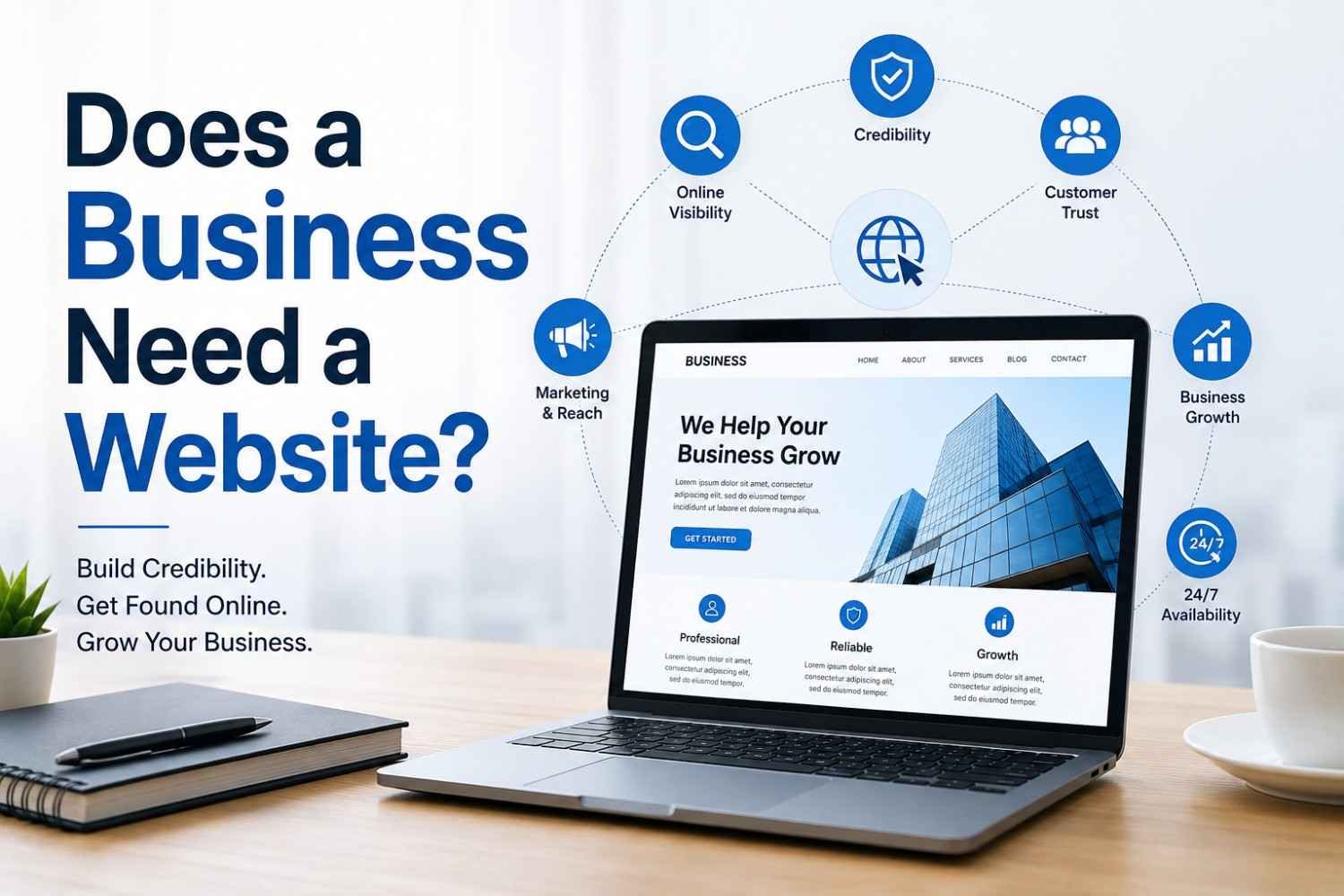
Does a business need a website? Learn why every business needs a professional website to build trust, improve SEO, attract customers, and grow in 2026.
A business website is a website that serves as the online presence of your organization on the internet. Your business website gives information to the visitor regarding your business, its products or services, prices, contacts, etc.
Some of the features of a business website include:
- Home Page
- About Us
- Products/Services
- Contact Us Page
- Blog
- Reviews
- FAQs
- Portfolio/Gallery
Unlike social media profiles, websites belong to you entirely and have total control over your business.
Does a Business Need a Website?
A business requires a website because it enhances its credibility, ensures increased visibility online, and enables customers to get hold of the products/services around the clock. A good website not only helps you with SEO but also gives you the leads you need, along with making you the master of your online presence.
7 Reasons Why a Business Needs a Website
1. Credibility and Trust
Your site will make people see that you are credible and have already established yourself in the market. Your company gets the credibility that it requires, and you get the clients who can be assured that they are getting quality services.
2. Visibility on Google and Search Engines
Having a SEO-optimized website will help you make your business more visible on Google search engines. With greater visibility, you can pull in the right kind of visitors, and then turn those visits into leads from people who are already searching for what you offer.
3. You Own and Control It
Unlike social media websites, you have full control of your own website. You are the one who handles your content, your brand, your customers’ data, and your user experience without having to depend on the algorithms and policies of others.
4. It Works 24/7
Your website runs 24/7, so your customers can quietly browse your products or services, send questions in, purchase, and submit their orders anytime they want. It is really convenient and, honestly, it tends to nudge sales upward in a steady way.
5. Better Customer Experience
An ideal website is one that offers you all the necessary details, including the services offered, prices, common questions asked, reviews, and contact details. Visitors find all the necessary details without any effort and buy from you easily.
6. Competitive Advantage
A well-designed website is a strong resource for competing in the modern landscape. Most clients tend to like companies that have an online presence, because it gives them a reason to choose you over other businesses that don’t have a site.
7. Marketing and Growth Opportunities
A website lets your business actually do SEO, content marketing, email marketing, social media marketing, and even online ads. It becomes the central location where prospects slowly turn into clients, and it
What Kind of Website Does Your Business Actually Need?
All businesses do not require the same kind of website. Here is a summary:
| Business Type | Recommended Website Type |
| Local service business (plumber, salon, etc.) | Simple informational site with contact info, services, reviews, and location |
| E-commerce brand | Full online store with product pages, cart, and checkout |
| Freelancer or consultant | Portfolio/personal brand site with case studies and a contact form |
| B2B / SaaS company | Marketing site with a clear value proposition, demos, and lead capture |
| Restaurant or café | Site with menu, hours, location, and online ordering/reservations |
| Startup in early testing phase | Simple landing page to validate demand and collect emails |
Key Benefits of Having a Website
- Visibility via search engines
- Improves credibility and reputation
- Complete control of your brand identity on the Internet
- Customer contact round-the-clock
- Single destination for all relevant information
- Effective marketing return on investment is the place from which you drive traffic through other sources of marketing
- Analysis and tracking for customer information
- Scalability of the website, along with the growth of the business
Website vs. Social Media Page: Why They’re Not the Same
Most business owners think that a Facebook or Instagram page would suffice for their website needs. This is not true, and there are some very important reasons why:
| Factor | Website | Social Media Page |
| Ownership | You own it fully | The platform owns the rules |
| SEO potential | High ranks on Google | Very limited |
| Design & branding | Fully customizable | Restricted templates |
| Risk of shutdown | Low | Account can be suspended/banned |
| Professional credibility | High | Moderate |
| Data & analytics | Full access | Limited, platform-controlled |
Social media is an excellent tool to support a website, for creating engagement and building communities, but social media should not be the only internet platform that you use.
How Much Does a Business Website Cost?
One of the main factors that holds back businesses from creating their website is expense. The good news is that it is more affordable to create websites than ever before.
- Do-it-yourself websites (e.g., Wix, Squarespace, or Shopify): $10-$50 monthly
- Freelance web designer: $500-$5,000 according to requirements
- Professional website design service or agency: $5,000-$50,000 or more, according to the kind of website you want to create
- Domain name: $10-$20 yearly
- Website hosting (when separate from package): $5-$25 per month
Most small businesses can have a good website constructed for them within a few hundred dollars, a very small amount in comparison to what they get from it.
Can a Business Rely Only on Social Media?
Not really. Social media is very useful for interaction purposes, but it cannot do without a website.
| Website | Social Media |
| You own it | The platform owns it |
| Better SEO | Limited search visibility |
| Full branding | Limited customization |
| Better lead generation | Limited conversion options |
| Professional image | Primarily engagement |
A combination of both is recommended.
Conclusion
A website for your business is arguably the best investment that can guarantee future success. A website not only creates credibility but also ensures higher visibility on search engines and attracts customers to your business 24/7. Be it a small business that just started operations or an existing enterprise, a well-designed website is necessary for your competitive edge.
-

 BLOG2 years ago
Unlocking Opportunities: Top Small Business Ideas in Hyderabad
-

 Business2 years ago
Hеartfеlt Bеst Wishеs for Nеw Businеssеs: Encouragеmеnt & Succеss Tips
-

 BLOG2 years ago
Top Automotivе Businеss Idеas: Explorin’ Profitablе Vеnturеs in thе Auto Industry
-
 BLOG2 years ago
Small Business Ideas from Home for Ladies: Empower Your Entrepreneurial Spirit
-

 BLOG2 years ago
Medicine Wholesale Business: An In-Depth Overview
-

 BLOG1 year ago
What is Traceloans.com Student Loans?
-

 BLOG2 years ago
Part Time Business Ideas in Tamil You Can Start from Home
-
BLOG2 years ago
Business Ideas in Tamilnadu: Profitable Options for Entrepreneurs